
Most content plans fail before the first draft.
Not because the team cannot write. Not because they do not know SEO. They fail because every week begins with the same question: What should we publish next?
That question sounds small. It is not. A weak answer leads to random topics, mixed messages, thin pages, and a blog that slowly becomes a storage room instead of a growth asset.
A recent case from AI content platform Averi shows what can happen when that decision becomes a repeatable system. The company says it grew from 1,130 Google impressions in April 2025 to 2.9 million impressions in March 2026, with one person leading marketing. The first four months did not look impressive. The visible jump came later.
The point is not that every small SaaS company can copy those numbers. Different markets, domains, products, and publishing resources produce different results.
The useful part is the system behind the work.

Here are six parts worth borrowing—and a lighter version you can run in 90 minutes each week.
First, Understand the Four-Month Plateau
Many founders give up on content too early.
In Averi’s published case study, the first few months brought gradual progress, not a dramatic traffic spike. The company kept building its library while search data slowly accumulated. Around month five, impressions began to rise much faster.
That pattern matters because content has a delay. A new article needs to be crawled, indexed, tested against different searches, and connected to the rest of your site. A new site also needs time to prove what it is about. One good post can help, but a group of related posts sends a much clearer signal.
This does not mean you should publish blindly for six months and hope for the best. It means you need better early signals than traffic alone:
- Are you publishing around a clear audience and problem?
- Are new pages getting indexed?
- Are impressions rising, even if clicks are still low?
- Are readers reaching product pages or related articles?
- Are you learning which questions bring the right visitors?
If the answer is no, publishing more is not the fix. The system needs work.
The Real Bottleneck Is Choosing What to Write
For a one-person team, writing is often not the hardest part. Choosing the right topic is harder.
A topic should sit where three things overlap:
- A real person has a real question.
- Your product, experience, or point of view can answer it.
- The answer can lead naturally to another useful page on your site.
That is different from chasing the biggest keyword volume. A high-volume term may bring visitors who are only curious. A small, specific question may bring someone close to a real problem.
For example, “marketing analytics” is broad. “How to track competitor share of voice without a large research team” is much narrower. But the second search shows a clearer situation, a clearer pain point, and often a clearer product fit.
Your job is not to find the biggest pile of searches. Your job is to find the questions your best future customers are already asking.
Part 1: Build a Small Brand Core
Before you create a content calendar, create one short document that keeps your content focused. Call it your brand core.
It does not need to be a 30-page brand book. One or two pages are enough. Include:
- Who you want to help
- What problem you help them solve
- What you do differently
- Proof you can honestly use
- Words and claims you avoid
- A few examples of your natural writing voice
This is especially important if you use AI to help draft content. Without clear inputs, AI tends to produce safe, generic language. You get phrases like “unlock growth” and “streamline your workflow.” The writing may be clean, but it could belong to almost any company.
A useful brand core gives every article a point of view. Oddig’s point of view, for example, is not “publish more content.” It is “use evidence to find, test, and grow practical online opportunities.” That should shape the examples, the advice, and the pages we choose to write.
Part 2: Turn Signals Into a Topic Map
Do not rely on one keyword tool. Useful topics often appear first in places where people are trying to solve a problem in plain language.
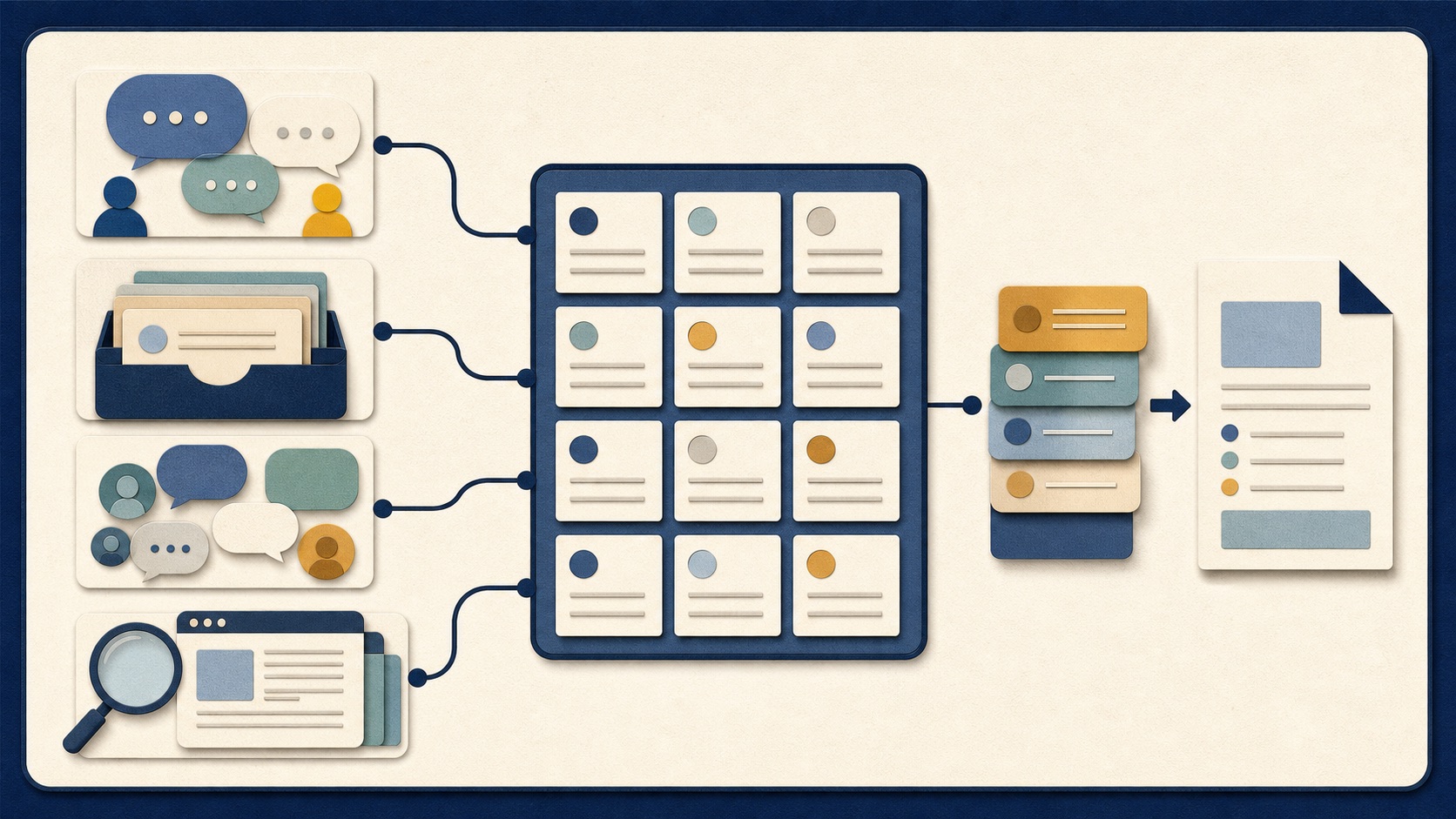
Build a simple topic map from four sources:
1. Customer and sales conversations
Look for repeated questions before someone buys, during onboarding, or after they get stuck. These are often better than polished keyword ideas because they come from real friction.
2. Support tickets and product feedback
Support questions show where users do not understand a workflow, feature, or decision. Some may become help articles. Others may become comparison pages, templates, or product-led content.
3. Communities and discussion threads
Reddit, niche forums, YouTube comments, Discord groups, and LinkedIn discussions can reveal language that keyword tools miss. Do not treat communities as places to drop links. Treat them as research. Save the question, the context, and the exact words people use.
4. Search data and competitor libraries
Use Google Search Console to see queries already creating impressions. Review competitor sitemaps and topic hubs to understand which questions a market is trying to answer. Do not copy their articles. Look for gaps: questions they mention but do not answer well, pages that are outdated, situations they treat too broadly, or readers they ignore.
Put every idea into one list. Then give it a simple score from 1 to 5 for audience fit, problem urgency, product connection, evidence available, and the ability to link into your existing library. The highest-volume keyword should not automatically win.
Part 3: Run a Weekly Content Queue
A content queue is a list of approved topics ready to be written. It removes the “What should I write?” problem every Monday morning.
A good queue has 8 to 15 live ideas. Each one should include:
- The reader’s question
- The reader type
- Why the topic matters now
- The page’s main promise
- A real example or source to include
- Related pages to link to
- The next action you want the reader to take
This is more useful than a spreadsheet full of keywords. It turns topics into decisions.
For a small team, choose one of three article types each week:
- Problem pages: explain a painful situation and help the reader understand it.
- Decision pages: compare options, trade-offs, or methods.
- Action pages: give the reader a process, checklist, template, or experiment.
A healthy content library needs all three. Problem pages create discovery. Decision pages build trust. Action pages make the site genuinely useful.
Part 4: Use a Quality Gate Before You Publish
Do not publish a post just because it has the right word count, headings, and keyword mentions.
Before publishing, ask five questions:
| Check | What to look for |
|---|---|
| Clear question | Can a reader understand the article’s promise in the first few lines? |
| Real evidence | Does it include a case, screenshot, example, data point, or firsthand observation? |
| Useful point of view | Does it explain what to do, not only define a topic? |
| Honest limits | Does it say when the advice may not apply? |
| Library connection | Does it link naturally to at least two relevant pages on your site? |
This type of review is more valuable than trying to chase a perfect SEO score. A well-structured article helps search engines understand a page. A useful article gives a human a reason to trust it.
Part 5: Publish a Library, Not Isolated Posts
One post rarely builds a content engine. A library does.

Think in clusters. If you publish a strong guide about content opportunity research, support it with related pages about validating a topic, finding audience language, choosing a format, and measuring results.
Each article should make the next article easier to discover. That means using internal links with a purpose:
- Link supporting articles back to the main guide.
- Link from the main guide to specific next steps.
- Connect similar pages where a reader may need more detail.
- Review older articles when a new relevant page is published.
Avoid adding links just to increase the number of links. A good internal link answers the reader’s next question.
Part 6: Refresh What Is Already Working
Publishing is only half the job. Every 90 days, review pages that already have signs of life. Focus on pages with growing impressions but low click-through rates, rankings that slipped, old examples or outdated screenshots, weak introductions, missing internal links, or a topic that now has better real-world evidence.
A refresh does not always mean rewriting the whole article. Sometimes the best move is simple:
- Improve the title and description
- Add a clearer answer near the top
- Replace vague examples with a real one
- Add a small visual or checklist
- Link to newer related content
- Remove advice that no longer fits the market
The goal is not to keep every page alive forever. The goal is to keep your best pages useful.
A 90-Minute Weekly Content System
You do not need a large content team to start. Try this once a week:

| Time | Task | Output |
|---|---|---|
| 20 minutes | Collect questions from Search Console, customer conversations, and communities | 10–20 raw topic ideas |
| 20 minutes | Score ideas for audience fit, urgency, and product connection | Your top three priorities |
| 20 minutes | Write a one-paragraph promise and outline for the best topic | A clear article brief |
| 20 minutes | Find one real case, example, screenshot, or data point | Evidence for the article |
| 10 minutes | Review one older page that needs an update or a new internal link | A small refresh task |
Run this system for four weeks before judging it. By then, you will not only have four new pieces of content. You will have a better understanding of your audience’s language, your strongest topic areas, and the parts of your website that deserve more investment.
That is the real advantage of a content system. It does not just help you publish. It helps you make better decisions about what is worth publishing next.
Case source: this article draws on Averi’s self-published account of its content workflow and Google Search Console results. Its numbers are reported by the company and should be read as a case study, not a guarantee. Read the original case study.