
Vaultaire is an iPhone app that locks your photos, videos and files in encrypted vaults. You open a vault by drawing a pattern. Its founder says the app made $66 in its first month and about $41,000 in a later month. There are no ads in it.
I went through version 1.1.2 screen by screen. Then I checked what I saw against the app’s changelog, its website and an interview with the founder. This is what I found about its app paywall, its free tier and its lifetime plan, and why a new app could win in such an old category. The revenue numbers come from the founder. I haven’t seen his sales data.
Read the revenue number carefully
In a Starter Story interview, founder Rasty Turek said he built the first version in about three weeks with AI coding tools. It was his first iOS app. At the time, he said the app was making about $2,000 a day and had passed 60,000 downloads.
Two things in that interview matter more than the $41K.
First, most people paid once. Lifetime purchases were about 60% of sales and more than 80% of revenue. So a $41K month is mostly one-time money, not recurring revenue. Don’t multiply it by 12.
Second, people didn’t buy right away. He said only 5.47% paid on day one, and the rate kept going up after day 35. People paid after they had used the app for a while.
How Vaultaire broke into a red ocean with its encryption model
Photo vault apps are old news on the App Store. Keepsafe, Private Photo Vault, Secret Photo Vault and lots of fake calculator apps have been around for more than ten years. Turek said Apple tends to rank those older apps first.
People do search for this. In Semrush’s US data, “photo vault app” gets about 1,300 searches a month and “private photo vault app” about 720. Both are hard to rank for, with keyword difficulty over 50.
So how does a new app get in? Vaultaire didn’t try to be cheaper or cuter. It changed how the lock works.
In many older vault apps, the PIN is like a door in front of a folder. The app checks your code, then shows you the files. Vaultaire’s comparison pages say some of these apps don’t even encrypt the files behind that door. Vaultaire works differently. Your pattern becomes the encryption key. Every file is encrypted on your phone with AES-256-GCM. Without the pattern, nothing can open the vault, not even the developer.
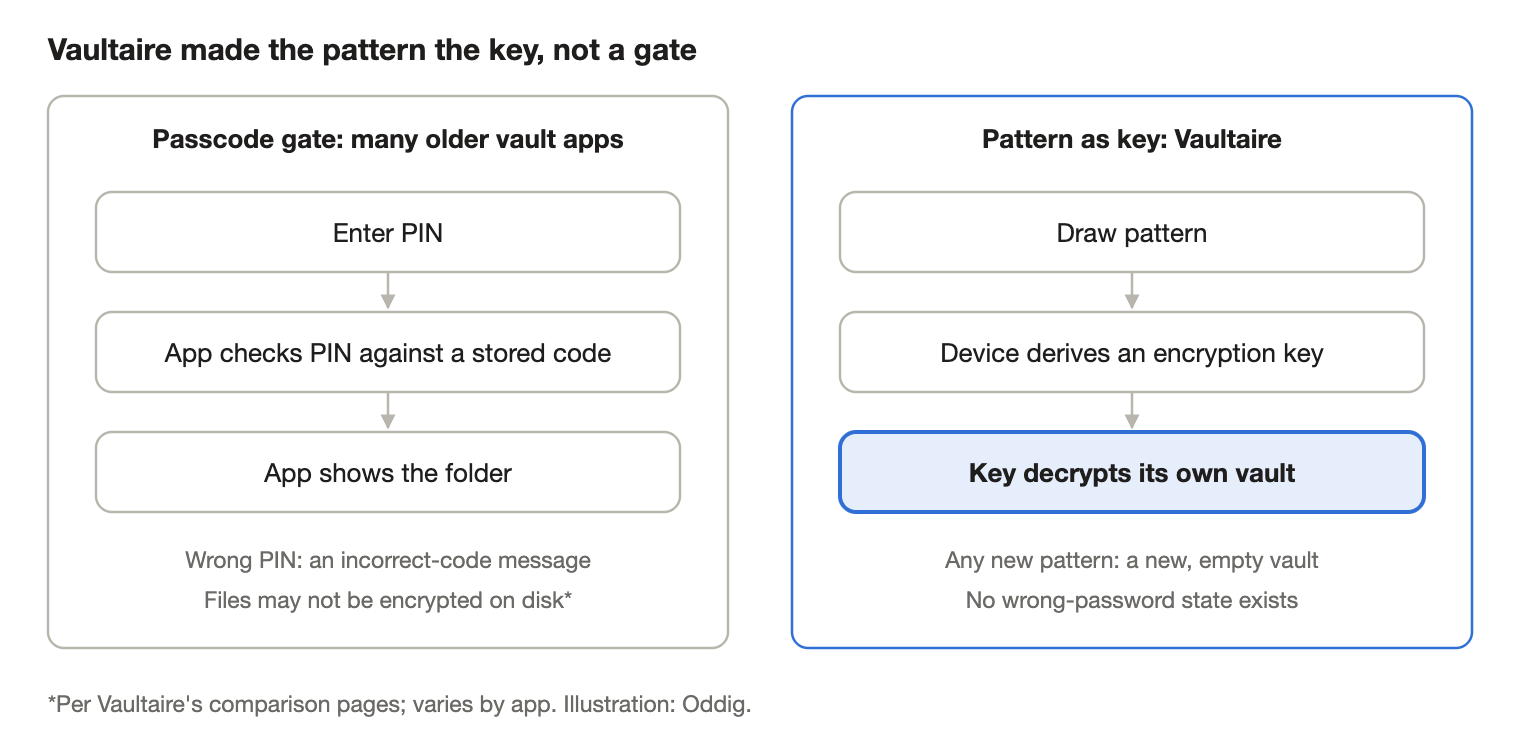
Almost everything Vaultaire sells comes from that one idea:
- No wrong password. Every pattern is a key, so the app never says “wrong.” That means it can’t tell anyone which vaults exist.
- Many vaults. Different patterns open different vaults. Someone looking at your screen can’t tell how many you have.
- A duress vault. A special pattern opens a fake vault and removes the way to reach the others on that phone.
- A developer who can’t help. There’s no account and no key on a server. If you forget your pattern, only your recovery phrase gets you back in. That sounds like a weakness, but in a privacy app it’s a selling point.
- Safe backups. Files are encrypted before they go to iCloud, so making backup free didn’t hurt privacy.
Here’s why the old apps can’t just copy this. They would have to move millions of users from a PIN to real encryption. That means moving everyone’s data and asking them to trust a new system. A new app can start that way on day one. And the idea fits in one line: “your pattern is the key.” That line shows up in the onboarding and on dozens of comparison pages.
Two caveats. Vaultaire isn’t the only vault with real encryption. Its own comparison with Inner Gallery admits that app encrypts on the phone too. What Vaultaire has is the full package, plus a clear way of explaining it. Also, the claims about other apps come from Vaultaire’s own marketing, and nobody has published an outside audit of Vaultaire.
One pattern, one vault, no wrong password
Here’s what this looks like in the app. On the unlock screen, any valid pattern opens a vault. A pattern I had used before opened that vault. A new pattern quietly made a new, empty vault with a random name, like “Vault ZPKO” or “Vault ZKCE.” There was no “wrong password” message. When I touched just one dot, nothing happened at all.
This is smart for privacy. It’s also how the app makes money, because the free tier limits how many vaults you get.
But it has a cost. If you mean to draw your real pattern and slip, you land in an empty vault with no warning. Someone who doesn’t know how the app works could think their photos are gone. That empty vault also uses up one of the three free vaults. And because the paywall shows up when you try to make a fourth vault, the limit itself hints at how many vaults are already there. Vaultaire’s own press release admits a related limit: anyone who can look inside the app’s files can count one encrypted index file per vault.
The onboarding sells before it sets up
The first time I opened the app, I went through eight screens before I could make a vault:
- A welcome screen with six reasons to use the app.
- Five short screens, one idea each: the pattern is the key, no traces, private sharing, private backup, the key stays on your phone.
- The app paywall, at 75% of the progress bar. It shows weekly, yearly and lifetime plans. The yearly plan is already picked, with a 7-day free trial. There’s a Skip button.
- When I skipped, a one-time “50% off your first year” offer popped up.
- A last screen: no account, no back door.
Only then did I get to draw my pattern. It needs at least six dots and one turn. I drew it again to confirm. Then I got a 9-word recovery phrase with Copy and Download buttons. I tapped “I’ve saved it,” the app asked me to confirm once, and that was it. It never checked whether I had really written the words down.
The paywall comes early, but you can skip it. Since most people paid weeks later, I think the Skip button matters as much as the paywall.
Where the app paywall appears
The same paywall shows up in four places: during onboarding, when you tap any Pro feature (marked with a crown), when you try to make a fourth vault, and when you tap Upgrade in settings. If you hit the photo or video limit while importing, the import just stops at the limit.
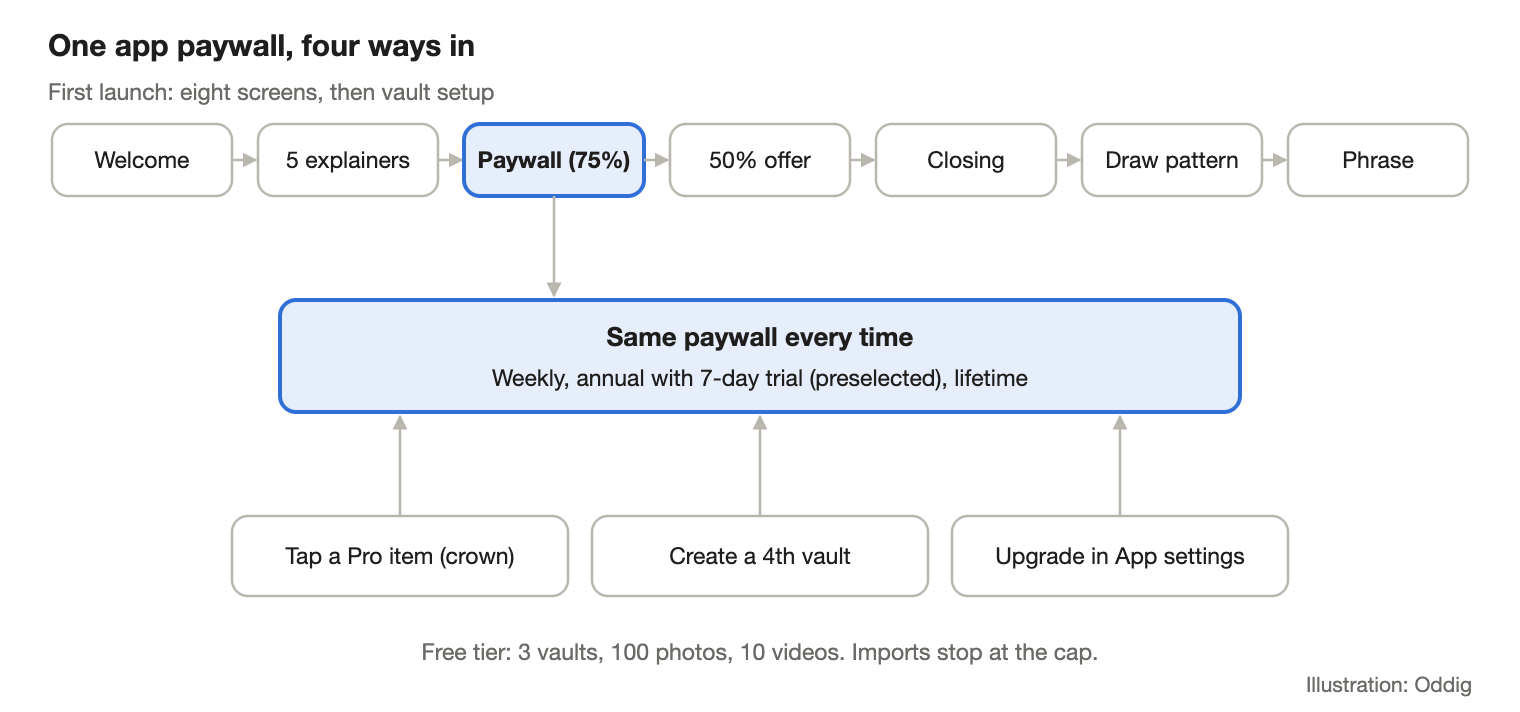
In the version I tested, the free tier gave me 3 vaults, 100 photos and 10 videos. Pro added the duress vault, vault sharing, slideshows, syncing across devices and other app icons. Pattern encryption and hidden vaults were free. In August 2026, Vaultaire also made encrypted backup free. The founder said charging for it had been the wrong call.
If you’re working out how to add a paywall to an app where trust matters, this split is worth copying. Keep the trust features free. Charge for extra convenience and power features. For a very different funnel built on paid ads, see our ChartDetector AI case.
How Vaultaire makes money without ads
Vaultaire’s comparison pages say there are no ads in any version of the app. All the money comes from the paywall.
In the interview, the prices were $1.99 a week, $19.99 a year with a 7-day trial, and $39.99 for lifetime. In China’s App Store, my recording showed ¥15, ¥148 and ¥298. Vaultaire’s comparison pages list other prices, including a $29.99 lifetime plan, and describe the free tier differently from page to page. Prices are clearly still moving, so treat any one number as a snapshot.
The weekly plan comes to about $103 a year. That’s more than five times the yearly price. It’s there to make the yearly plan look like a deal. I’m not sure that trick fits an app that sells itself on trust.
The lifetime plan is what pays the bills. People who buy a vault plan to keep it for years, so paying once makes sense to them. Cat on Chair, a very different iOS app, saw the same thing: most of its sales were lifetime too.
Version one was not feature-complete
The “built in three weeks” story is true, but it’s not the whole story. The changelog shows basic features arriving months later. Photo rotation came in 1.0.12. Swiping between videos came in 1.0.14. Folders came in 1.0.18. A video progress bar came in 1.0.20. Several updates also fixed backup and sync bugs, like blank thumbnails and old copies overwriting new changes. Version 1.1.0 came out about seven months after launch.
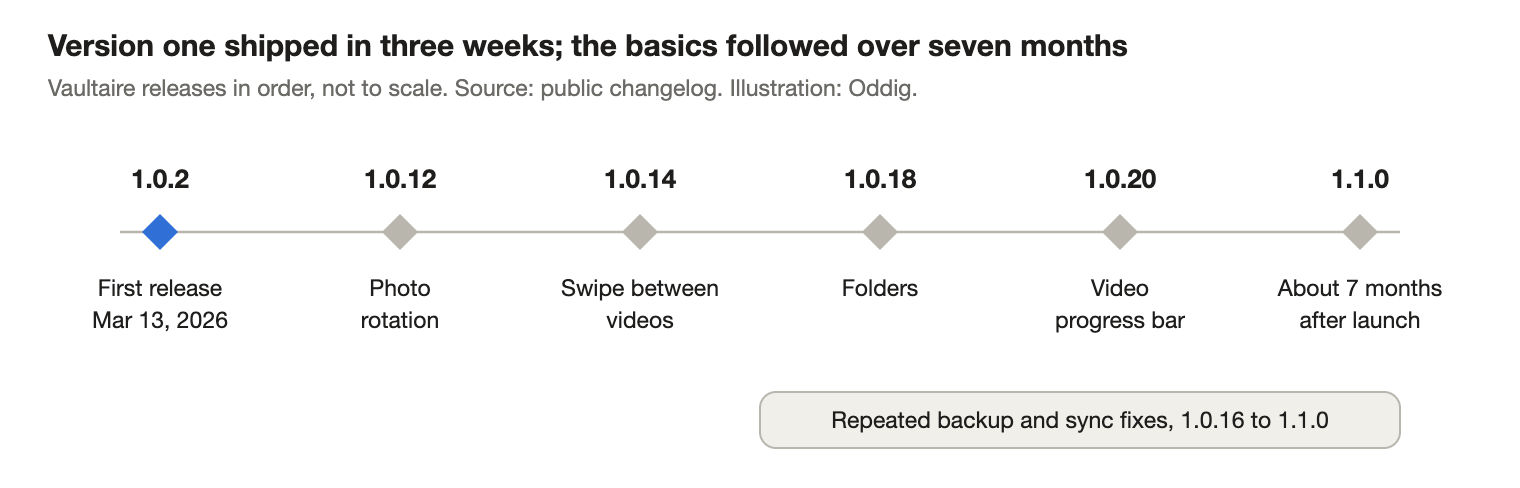
So the lesson isn’t “ship in three weeks.” It’s that a small core that really worked, encryption and unlock, was enough to start making money. The rest came later.
Distribution: search, not virality
Instead of fighting ten-year-old apps only in App Store search, the founder built a website full of how-to guides and comparison pages, like “Vaultaire vs Keepsafe” and “Vaultaire vs Private Photo Vault.” A newsletter breakdown of the interview describes his daily routine. Each morning, Claude goes through Google Search Console data and finds searches where the site shows up thousands of times around position 50 but gets no clicks. Then it drafts one guide on that topic, and the founder checks it. The website reportedly brings in most of the traffic, and about 10% of visitors go on to download the app.
The comparison pages work because there’s something real to compare: the encryption model in Figure 1. It’s the same point we made about programmatic SEO needing proprietary data. Pages only scale when each one says something different.
Trade-offs and open questions
- Privacy policy vs. settings. The privacy policy says analytics and crash reports are opt-in. But in the 1.1.2 build I recorded, the “share errors anonymously” switch looked like it was on by default. If this matters to you, check your own settings.
- Compressed by default. New imports use an “Optimized” setting that the app says can make files up to 85% smaller. If you want the originals, you have to change it in settings.
- No phrase for new vaults. Vaults made by drawing a new pattern skip the recovery phrase screen. You have to create the phrase later in that vault’s settings.
- No public audit. The founder says he can’t see your files. That describes the design, but it’s not the same as an outside security review.
What to borrow
- In a crowded market, look for a weakness the big players can’t fix without moving all their users. Then build your product around it.
- Pick an idea you can explain in one sentence. It becomes your onboarding, your comparison pages and your trust story.
- Give away the trust features, like encryption and backup. Limit how much people can store.
- Offer a lifetime plan, and don’t expect most people to pay on day one.
- Use your Search Console list of “lots of impressions, no clicks” searches as a to-do list for new articles.
What still needs proving
- How much money is left after App Store fees, refunds and support.
- How many free users stay if they never hit a limit.
- Whether search traffic holds up once competitors write the same comparison pages.
FAQ
How does Vaultaire make money without ads?
Through a freemium app paywall. The free tier limits vaults, photos and videos. Pro removes the limits and adds features like the duress vault, sharing and sync. The founder said lifetime purchases made up more than 80% of revenue.
Where should an app paywall appear?
Vaultaire shows its paywall once during onboarding, with a Skip button. After that, it only appears when someone reaches for a Pro feature or hits a limit. Since the founder said people kept paying weeks after they installed, the later moments seem to matter as much as the first one. Test this with your own retention data before you copy it.
Is Vaultaire’s encryption independently audited?
Not publicly, as of October 2026. Its pages describe AES-256-GCM encryption on the phone with a key made from your pattern, but no outside audit has been published.
Sources & further reading
- Starter Story interview with Vaultaire founder Rasty Turek. Revenue, conversion, pricing and build-time figures come from the interview.
- Vaultaire privacy policy, accessed October 30, 2026.
- Vaultaire vs Secret Photo Vault and Vaultaire vs Inner Gallery, Vaultaire’s own comparison pages, accessed October 30, 2026.
- Vaultaire’s public changelog, used for the release history in Figure 3.
- Vaultaire press release on free encrypted backup, August 30, 2026.
- Candyblocks Sauce #17: Vaultaire, a summary of the interview’s growth routine.
Reporting note: I walked through Vaultaire 1.1.2 in October 2026. Oddig has not verified the founder’s revenue, conversion or download numbers. The figures in this article were drawn by Oddig and are not app screenshots.